DS Office · Durgasoft Office · no-code management
Compose the management software your organisation actually runs.
DS Office is a no-code desk: projects, collections, dashboards and Drive. Forms and custom logic sit underneath. The client picks the system — payroll, assets, HR, a law firm, GST packs, a school — and operates it as one product.
- Entire company flow on one workspace
- You choose the use case — 20 desks, same product
- Coming soon: prompt in English or Kannada, skip the manual record
DS Office
Get a live DS Office workspace
No credit card. A specialist maps your billing and forms to a live workspace.
Inside DS Office
The client picks the software. You still see one product.
Project → collections → dashboard → form → Drive. Same pattern for payroll, assets, a law desk or a school. Forms do the work underneath. The screen the team opens is management software.
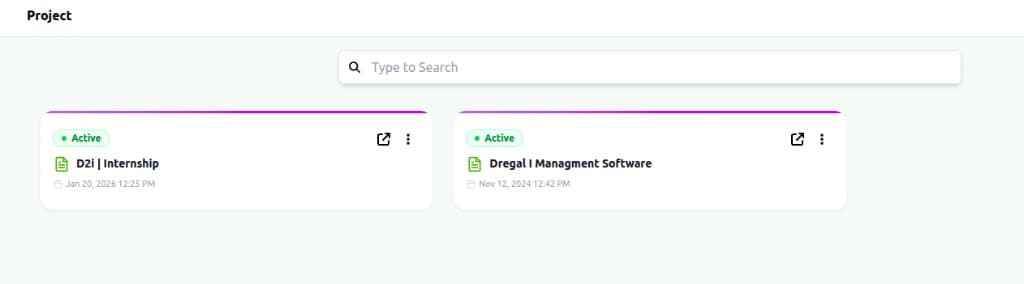
Projects — one workspace per company
Open a project. That is the firm. Everything else lives inside it.
Entire company, one product
Build the operating flow of the organisation — then run it.
Payroll, assets, people, billing, legal files, Drive. Each is a collection with custom logic. Together they are the company. No-code: you design it; DS Office hosts it.
Workspace
One project is the company. Roles, Drive and collections start here.
Collections you pick
People, payroll, assets, billing, cases, vendors — only what the organisation needs.
Records & forms
Each collection has a form with fields, relations and rules precise to that desk.
Logic & documents
Approvals, calculations, GST templates, file-name builders — configured, not coded.
Operate
Dashboards, Drive, reports. The end product is the management software the client chose.
DS Office capabilities
No-code underneath. Management software on the screen.
Inspired by how serious no-code desks are sold: you compose applications. Forms are the material. The client still gets payroll, assets, HR or a law firm — whichever they picked.
Projects & collections
A project is the company. Collections are the modules — payroll, assets, people, matters — named by you.
- Active workspaces
- Search across collections
Dashboards that feel like software
Tagged columns, files, bulk actions. The team works a management desk, not a blank form.
- Filters and roles
- Record view + edit
Forms as the quiet engine
Every record is a form with fields, relations and rules. That is how no-code suites actually work — the end product is still the system the client chose.
- Custom fields
- Scenario logic
Relations across the firm
Link an asset to a person, a payroll line to attendance, a matter to a client. One graph.
- Cross-collection links
- No orphan records
Drive & documents
Invoices, affidavits, templates. GST reports with template tags and a file-name builder — custom logic, no code.
- Template engine
- Configure file names
Same desk on every device
Full workspace on mobile. Roles travel with the login.
- Responsive
- Same permissions
Coming soon
AI-based managementStop creating records by hand. Prompt the desk.
First languages: English and Kannada. Type what should happen — a record, a payroll run, a simple analytic. DS Office writes it into the collection you already designed. Regional languages will follow; we are not making that the story today.
You type
“Add a new asset: Dell laptop, assigned to Accounts, purchased June 2026.”
DS Office AI
Maps the prompt to your collections, fields and roles
Done in the system
Record created in Assets · linked to People · Drive folder ready
Analytics prompt
“Show overdue invoices this month.”
How teams go live
Name the software. Then run it.
Open a project
That project is the company. Search, roles and Drive start empty — on purpose.
Add the collections you need
Payroll, assets, people, matters, invoices. Each collection is a module with its own form and logic.
Operate from the dashboard
Records, tags, files, reports. The team never has to know they are filling a form.
20 use cases — pick one
The client chooses the desk. We do not.
Billing is one option. So is a law firm, payroll, assets, HR, a school. Tap a card to start a trial mapped to that use case.
One company, three lines
Product first. Services only when you need a bench.
Flagship product
DS Office · Durgasoft Office
No-code management software. This is what most visitors are here to buy.
Explore the productDregal i Services
Software, cloud, security, data, AI — and the stack we build with. Kept on that page.
View services →D2i
Dregal I Internship Program
500+ trained. MERN, Python, Java, cybersecurity, corporate batches.
Meet D2i →Transparent seats
DS Office pricing
Pay for seats. Keep the operating model you designed.
Business Starter
Solo operators and tight teams
- ✓Up to 1 projects
- ✓15 collections
- ✓1,00,000 records
- ✓18 roles
- ✓Core field types + form logic
- ✓Unlimited users
- ✓Core field types
Professional
Growing firms with real billing complexity
- ✓Up to 3 projects
- ✓20 collections per project
- ✓10,00,000 records per project
- ✓Unlimited roles
- ✓Unlimited users
- ✓All field types + Conditional form logic
- ✓Priority email support
Enterprise
Multi-entity, custom billing, dedicated care
- ✓Unlimited projects & records
- ✓Unlimited roles and users
- ✓Advanced analytics
- ✓Guided onboarding
- ✓Premium support
Operators, not slogans
Firms already running on DS Office
“We modelled the practice in DS Office without writing a line of code. Client files, deadlines and billing finally sit in one place.”
Vittal
CA firm, Mangaluru
“End-to-end customisability meant the workflow matched the firm — not a generic compliance template we would have fought every week.”
RK Bhat
Detax Taxation, Mangaluru
The honest comparison
Why operators pick DS Office
Depth that used to mean a multi-year programme — sized for firms that still answer their own phones.
| What you care about | DS Office | Traditional suites |
|---|---|---|
| What you buy | A management system you compose | A catalogue of modules |
| How it is built | No-code collections, forms, logic | Consultants and custom code |
| Company flow | Payroll, assets, HR, legal — one project | Separate products, exports |
| Documents | Templates + file-name builder | Locked print layouts |
| Go-live | Weeks | Often 12–18 months |
| Coming soon | Prompt in English or Kannada | Still a form for every record |
Questions teams ask before they buy
14 days. No card.
Stop running the company from twelve spreadsheets.
DS Office is no-code management software: payroll, assets, HR, legal, billing — whichever desk you pick — on one workspace.